How to Sign Up for myUCLAhealth
Two Ways to Sign-up for myUCLAhealth
myUCLAhealth offers patients personalized and secure on-line access to portions of their health information. It enables you to securely use the Internet to help manage and receive information about your health.
Self sign-up
Patients have the option to request an activation code on our website (myUCLAhealth.org); this option is not yet available on our MyChart mobile app. This applies to all patients ages 12 and older. The account being activated can only be requested by the patient themselves.
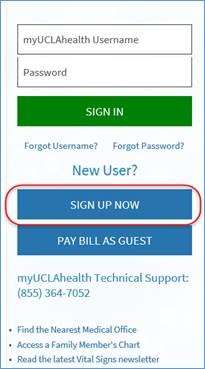
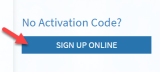
On the website’s log in page, click on the “Sign Up Now” button and then under “No Activation Code?” click on the “Sign Up Online” button.
Please fill out the required information and then you will be led through a series of questions that will be directly linked to our third party verification system.
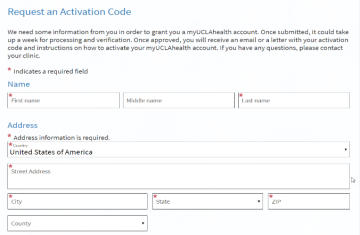

You will receive an activation code via email or text within 2-4 business days or an email with next steps on how to sign up for myUCLAhealth.
If you are a new patient, please present in-person at your next doctor’s visit with photo identification to sign up for myUCLAhealth.
Instant activation
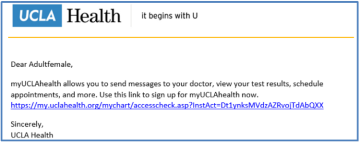
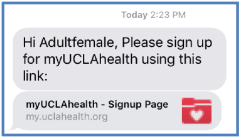
Due to the rapid expansion of Telehealth, as a result of COVID-19, our clinic staff can now remotely sign-up patients for myUCLAhealth via Instant Activation. With one click, they can send patients an email or text message with a link to sign up for myUCLAhealth. Feel free to give them a call.
Text
If you need proxy access to your adolescent’s medical record, a consent form may be required. A UCLA Health representative will discuss this with you, if applicable. Learn more.
What is a Proxy?
A proxy is a person who has been granted access to view another patient’s health information.
How do I request proxy access?
To request proxy access, please contact your doctor’s office. They will confirm the appropriate access level and assist you with the steps based on the patient’s age and situation.
For children ages 0-11:
Parents and legal guardians may be granted full proxy access. No consent is required.
For adolescents and teens ages 12-17:
California confidentiality laws protect certain aspects of an adolescent’s medical information. Only limited proxy access is granted to parents/guardians.
Before granting limited proxy access:
- Verbal consent from the adolescent is required at an appointment.
- Access to appointments, medications, messages and notes is restricted by California to protect adolescent privacy.
Once limited proxy access is granted:
- Parents/guardians will receive limited access (for example: allergies, immunizations, some test results).
To enable video visits and full portal features for your adolescent, we encourage the adolescent to have their own myUCLAhealth account. Your clinic can help with setup on or after their 12th birthday.
For full, up-to-date instructions — including what parents can see for adolescents and how to prepare for when your adolescent turns 12 — please visit our Proxy Access information page.
For ages 18+:
Adult patients can grant proxy access by completing a consent form. The doctor’s office can provide this form and explain the process.
Patients may also use the Proxy Invite feature in myUCLAhealth:
- Go to “Your Menu.”
- Select “Sharing.”
- Choose “Share My Record.”
- Enter the required information and send the invite.
Both parties must have active myUCLAhealth accounts. The invited proxy will be asked to confirm the patient’s date of birth before access is granted.
For patients with diminished capacity:
If an adolescent, teen or adult cannot make medical decisions due to diminished capacity, a specific consent form must be completed. The patient’s clinician must verify diminished capacity before proxy access can be approved. Your doctor’s office will guide you through this process.
No consent forms required for children 0-17 years old:
However, if your child is between the ages of 12-17 (which is considered an adolescent in the state of California), verbal consent from the teen must be obtained prior to granting proxy access.
Note: Proxies of adolescents ages 12-17 will have limited access to the teen’s medical record (i.e., Health Issues, Allergies, Immunizations, and Test Results) and will not have access to past and future appointments (which enables video visits), hospital admissions, letters, referrals, clinical notes and medications/refill requests. If you are interested in a video visit for your teen, we encourage you to allow the teen to have his/her own myUCLAhealth account so that a video visit is possible.
For information about the California Confidentiality Law, please visit the National Center for Youth Law or the California Adolescent Health Collaborative.
Your secure online health connection
Need help using myUCLAhealth?
Call our 24/7 Patient Help Desk 855-364-7052 or email [email protected].
Download myUCLAhealth App